
The two border types in KMPS 4.0
Version 4.0 works with simple borders and creative borders. Both use PNG files, but each one works differently.
Both border types use the alpha channel. The photo area must use alpha 0, fully transparent.
A simple border is a PNG placed over the photo. The customer frames the image underneath it. The file name identifies the print size and design.
6x8_Ho Ho Ho 1.pngA creative border also defines where the photo goes and how much space it occupies. The customer adjusts the photo within that rectangle. The file name adds four values: x, y, width and height.
6x8_120_160_1560_2080_Negro V.pngPNG dimensions
A creative border PNG must use the exact dimensions of the paper at 300 dpi.
| Size | Portrait | Landscape |
|---|---|---|
| 4x6 | 1200 × 1800 | 1800 × 1200 |
| 5x7 | 1500 × 2100 | 2100 × 1500 |
| 6x6 | 1800 × 1800 | 1800 × 1800 |
| 6x8 | 1800 × 2400 | 2400 × 1800 |
| 6x12 | 1800 × 3600 | 3600 × 1800 |
| 6x14 | 1800 × 4200 | 4200 × 1800 |
| 6x18 | 1800 × 5400 | 5400 × 1800 |
| 6x20 | 1800 × 6000 | 6000 × 1800 |
| 8x4 | 2400 × 1200 | 1200 × 2400 |
| 8x10 | 2400 × 3000 | 3000 × 2400 |
| 8x12 | 2400 × 3600 | 3600 × 2400 |
Define the photo area
Upload your image and adjust the rectangle over it. The tool calculates the four values in pixels for your file: x, y, width and height, and prepares the PNG name.
The software uses the coordinates only when the PNG exactly matches the paper size. Otherwise, it treats the file as a simple border. The catalog shows the numbers next to the name, for example "120 160 1560 2080 Negro V".
Preview for each border
Each border can include its own preview. It is a JPG shown on that border’s card.
Save it beside the PNG with the preview_ prefix and the same name.
6x8_Ho Ho Ho 1.pngpreview_6x8_Ho Ho Ho 1.jpgThe preview must have 512 px on its longest side and keep the border’s proportions. The application displays it in full without cropping it.
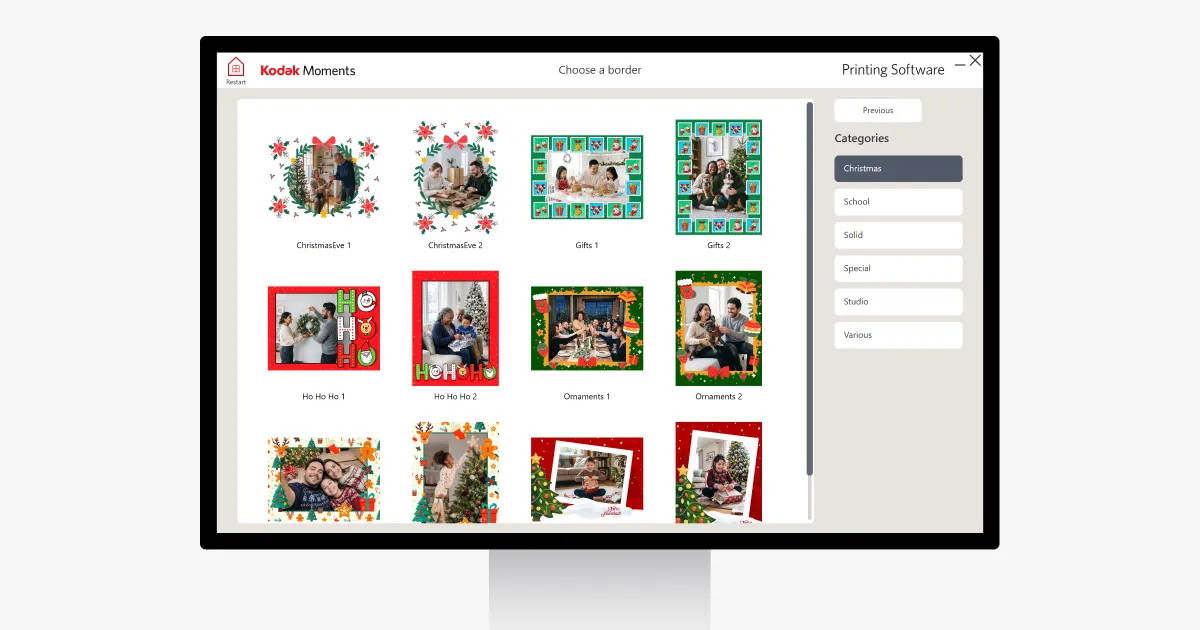
The application keeps the preview you provide. If it does not exist, it creates one when the category opens. To regenerate it, delete the file and open the category again. Files beginning with preview_ are not offered as borders.
How to add borders
Organize the PNGs and their previews in one folder per category. Include both orientations when you offer them. The software supports up to six categories, uses each folder name and sorts them alphabetically. It does not scan subfolders.
A border appears only when it matches the loaded paper. A 6x8 border is not shown with 4x6 paper.